From .xlsx to Live Grid.

A real .xlsx embedded as a live browser artifact: formulas recompute in the page, formatting survives, and the same skill can generate editable, cloud-saved versions.
From .xlsx to Live Grid
The grid above is a real workbook running inside the page, not a screenshot and not a static HTML table. Change a driver cell and the dependent formulas recompute in the browser. The public demo resets on reload; the same skill can generate editable, cloud-saved versions when a host provides the write backend.
It starts with a familiar email: "Can you update the model?" Attached is forecast_v18_FINAL_v2_USE_THIS.xlsx. Inside are years of accumulated business logic: revenue drivers, margin waterfalls, sensitivity tables, formulas pointing to formulas on sheets nobody wants to rebuild.
The spreadsheet works perfectly, which is exactly the problem. Because it works, nobody rewrites it. So it stays in Excel, gets emailed around, and forks every time someone saves a local copy.
The important move is not to rebuild that logic in JavaScript or Python. The spreadsheet already contains the application. The job is to promote it: keep the formulas, preserve the formatting, and let the browser make the model part of the page.
python3 scaffold.py <source.xlsx> <slug> "<Title>" [portal_dir]Point it at a spreadsheet and a slug. It writes three things: the workbook converted to Univer's IWorkbookData JSON, a border sidecar the Excel exporter overlays at write time, and an HTML page with the grid, a Save / Save version / Download Excel / Revert toolbar, and a versions panel. This page uses the live embed path; editable persistence is the fuller mode of the same skill. The skill installs its own runtime, then reports any heavy site-specific assets it expects the host to provide.
The runtime
Univer handles the grid – Apache 2.0, ships a render layer, a formula engine, a dependency graph, and an editing surface. The bundle is roughly 2.5 MB gzipped, so it never loads on a page that doesn't need it. An IntersectionObserver waits until a workbook is about to scroll into view, then fetches the bundle once and shares it across every embed on the page.
Conversion is an openpyxl pass. Each cell's font, fill, alignment, and number format map into Univer's compact style map; identical styles deduplicate by hash. Formulas are stored as formulas, not their last-cached values. That's the entire point: the reader perturbs a driver, the workbook recomputes client-side, the same as it would in Excel.
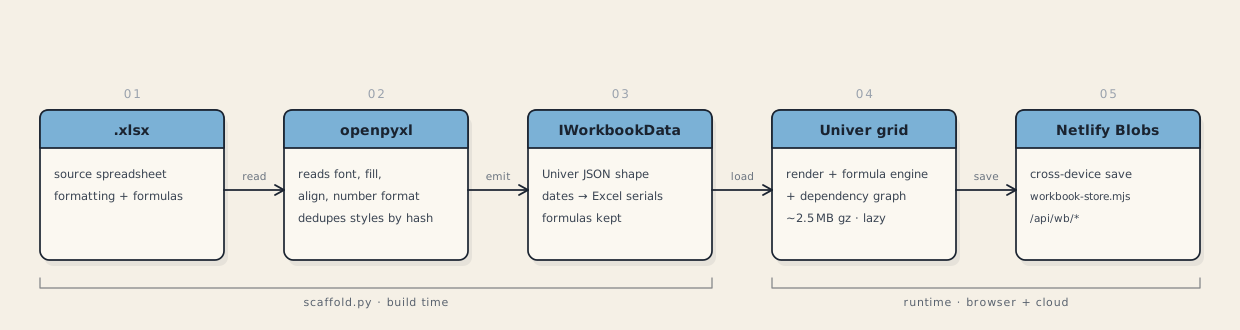
openpyxl pass maps every cell's styles and formulas into the JSON Univer renders in the browser – formulas stay formulas, so the grid recomputes client-side.Persistence
Editable mode persists changes through a single Netlify Function – workbook-store.mjs, mounted at /api/wb/*. Storage is cross-device: whatever was last saved loads next, on any machine.
Each workbook ID owns its own blob keys:
<id>/baseline– the original, seeded on first save, never overwritten<id>/autosave– the latest saved working state<id>/index– the version list:[{ ts, label, changeCount }]<id>/v/<ts>– one blob per saved version, full snapshot plus change record
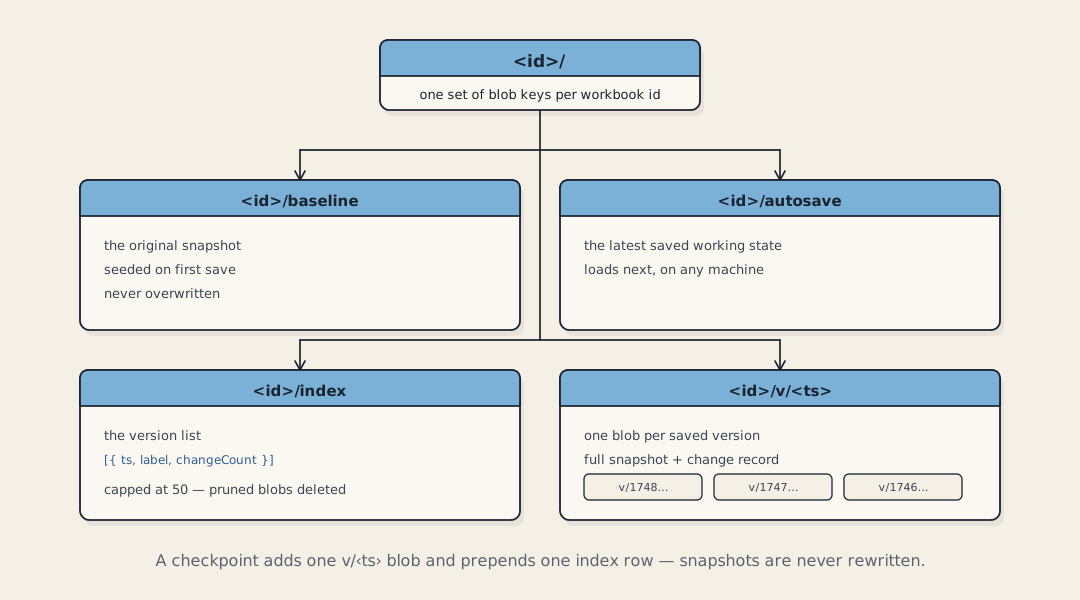
Saving a checkpoint writes a new v/<ts> blob and prepends one row to the index. It never rewrites existing snapshots. The index is capped at 50 versions; pruned versions have their blobs deleted.
Saving is explicit. Edit a cell and the grid turns dirty – a status hint appears, leaving warns you – but nothing writes until you click Save. Save version cuts a named checkpoint and records a cell-level diff against the baseline: "Model!B3: 110 → 121." The versions panel shows exactly what changed, not just that something did.
Formatting
Formatting loss reads as a downgrade. The converter captures fonts, fills, alignment, and number formats from the source, so modeling color conventions survive the trip: blue hardcoded inputs on a yellow fill, black formulas, green cross-sheet links. None of it needs special handling – it rides along as ordinary cell styles.
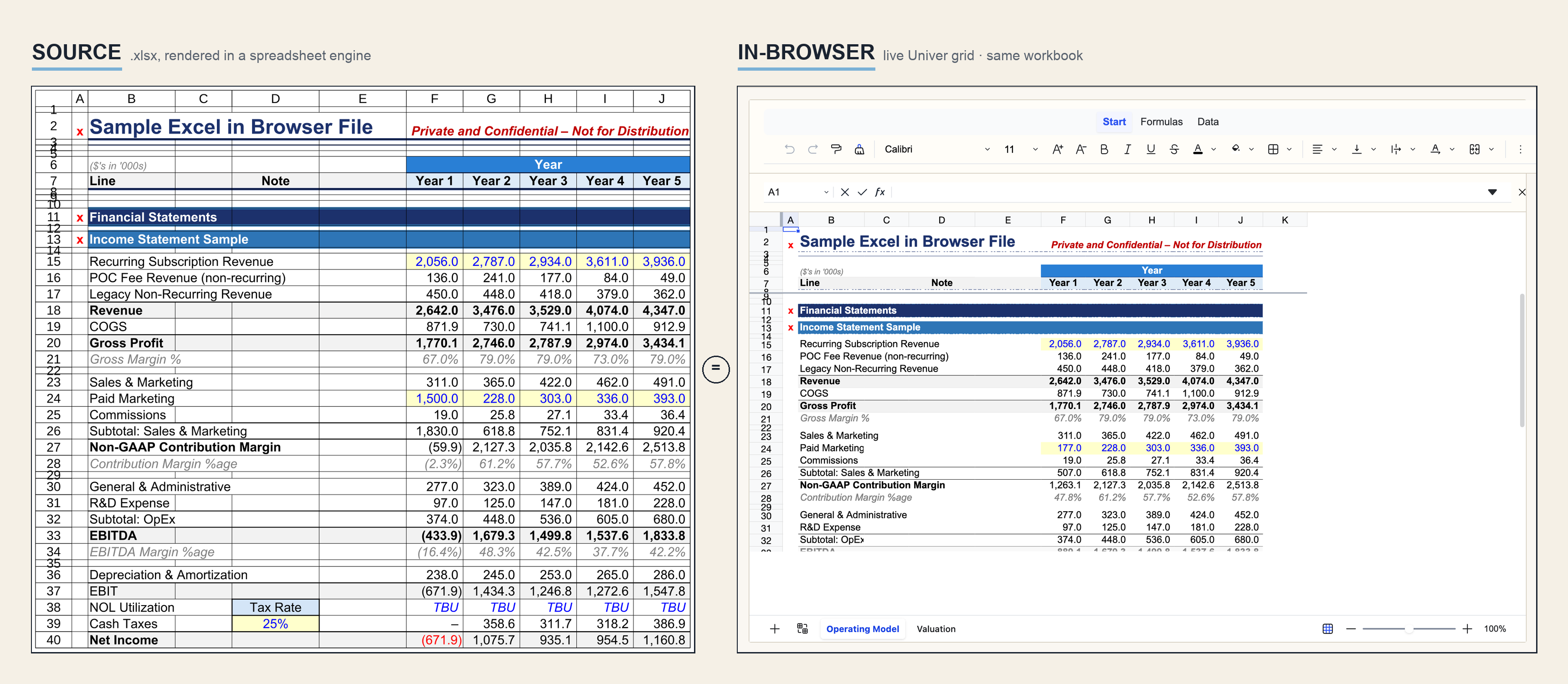
The Download Excel button exports the live grid, not the original file. It serializes the current Univer snapshot back to a real .xlsx using xlsx-js-style, mapping compact styles back to cell-level formatting: bold, color, solid fill, alignment, wrap, and number format. Borders can't survive that round trip, so they're sourced from the .borders.json sidecar and overlaid at export. The downloaded file matches the source.
Hardening
Two layers do the work.
On the client, the mounter fails soft. It carries a documented charter of failure modes it refuses to crash on: a container that's zero-width at mount and widens later, a backgrounded tab, a bundle that fails to load, malformed data, a double mount, a host removed from the DOM, a grid mounted and later torn down. A watchdog re-mounts a grid whose canvas disappeared, capped at three attempts so it can't loop. Every error message is HTML-escaped before it's shown.
On the server, the storage function validates before it writes. Workbook ID checked against a strict pattern. Bodies rejected over the size cap before and after parsing. JSON parsed defensively. Shape check on the payload – id is a string, sheets is an object, sheetOrder is a non-empty array. Writes are origin-checked against an allow-list and rate-limited per workbook in a sliding one-minute window. Negative responses carry no-store so a CDN can't cache a 4xx and lock the API into a wrong answer.
Things to avoid
Don't put the write key in the bundle. Anything shipped to the browser is readable. The key lives only in an environment variable; the client fetches it at runtime from an origin-gated endpoint. If the variable isn't set, the function refuses writes rather than falling open.
A client-side password gate is convenience, not protection. The real lock is the server-side key plus the origin check on every write.
Persistence is shared cloud state, not per-user. Everyone editing a given workbook ID sees the same saved state. That's the right model for a small private portal; it is not a multi-tenant document store. Put editable embeds behind your own auth.
Mind the bundle weight. 2.5 MB gzipped is fine for a tool a reader came to use. It has no business on a marketing landing page. Lazy-load it, and budget two or three live grids per page – each mounted instance holds its own in-memory state.
What's next
Plain markdown files are losing ground to self-contained HTML documents – pages that carry their own styling, structure, and interactive logic.
A spreadsheet that actually computes fits that mode naturally. A markdown table is a screenshot with extra steps. An embedded workbook is the model itself. HTML reference docs can hold one inline, so the reader changes an assumption and watches the dependent numbers move – without leaving the page, without downloading a file.
Documentation, teaching material, analysis – the spreadsheet isn't an attachment. It's a first-class, living part of the page.